Receiving registration documents from the team prior to allowing them to play is a critical part of your event. Many times, your association will require these documents to be on file for insurance and rule compliance. Sometimes, the only way to compel compliance is to levy a fine.
You can now do this in the Team Applications Module.
Setting up the fine
To attach a fine to a team, you must first define the Fine in the Team Applications Module>Set up Add-ons/Discounts>GO!
Add the Fine to the top line and click Add
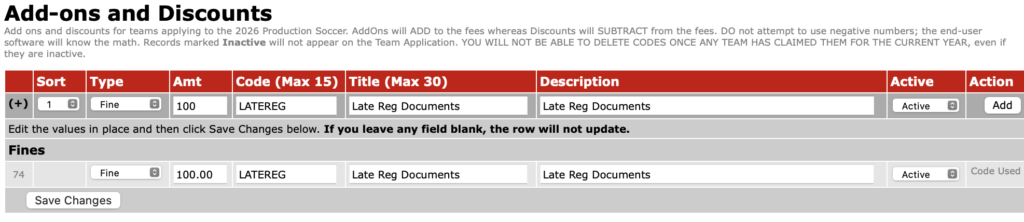
Once you have set up a fine, you can now assess it against a team(s) one of two ways; individually or in bulk.
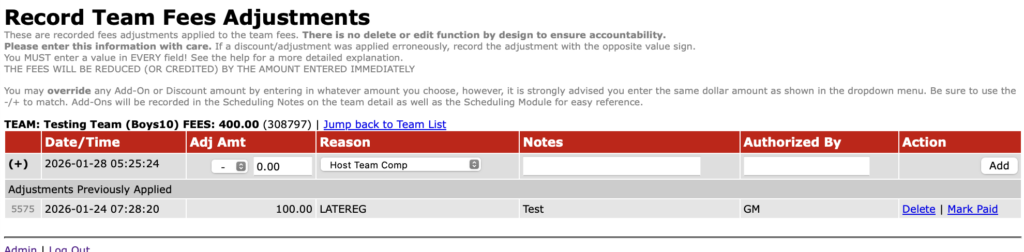
To assess it to the individual team, search for the team in the Team Applications Module using the filters. On the team listing, click on the ADJ+ next to the team name and enter a fine. You should allow the software to fill in the fee amount, but you can edit it after it fills in if you want (not advised, you should set up additional fines if you have multiple amounts to assess)
The fine will then appear in the far right column on the team listing.
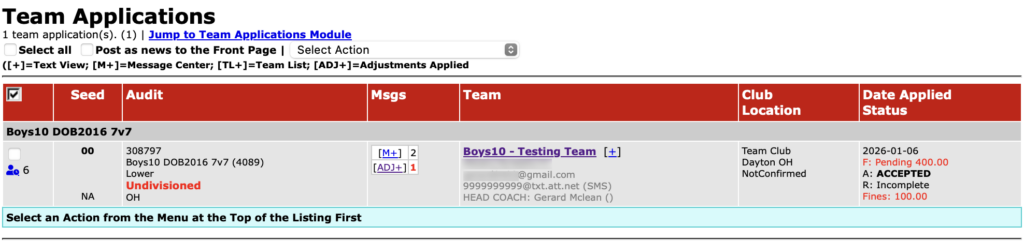
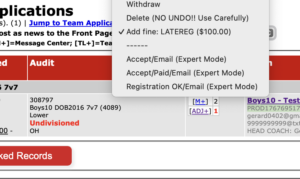
To assess fines to multiple teams in bulk, create a team listing in the Team Applications Module using the filters.
– Select the fine from the drop down menu at the top.
– Check the team you wish to assess a fine to.
– Double check you have selected only the teams you want fined.
– Click the Mark Checked Records at the bottom of the listing.
If you are using Stripe as your processor, the team will see a Pay via Credit Card when they log in. This pay button will be separate from their team fees. If they have not yet paid their team fees, they will see two buttons to pay, one for fines and one for fees. When they pay, the fine will be marked PAID automatically.
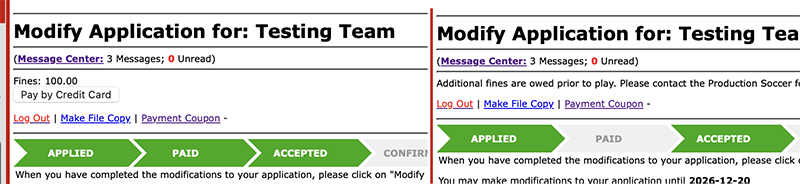
If you are not using Stripe*, you should mark the fine PAID after they pay you via check, cash, PayPal or Venmo by searching for the team and clicking on the ADJ+ next to their team.
You can also delete the fine if you change your mind about assessing it or if it was assessed in error.
*We only support Stripe for paying fines directly in the Team Application at this time. We may expand this offering at some point in the future.